%20(1).png)
Track Laptop Shipments
Introduction
When an employee leaves your company or otherwise needs to send their assigned laptop somewhere, you can request that they return their assigned laptop using Electric's convenient, box-less laptop shipment feature.
We’ve made monitoring requests just as easy, with helpful status update emails and a visual dashboard to monitor all return shipments.
Accessing the tracking view
Navigate to "Track laptop shipments" from the main menu in your Electric dashboard. This view is available to all admins.
The tracking view displays key information for each shipment request:
-
The request creation date and days to expiration
-
The name of the employee shipping the device
-
The laptop model name and serial number, when available
-
The destination city and state
-
The UPS tracking number and current shipment status
Checking detailed tracking information
Click on any UPS tracking number to view complete shipping details on the UPS website, including estimated delivery dates and the full tracking history.
The tracking view is especially helpful when managing multiple device returns simultaneously. Rather than tracking updates across multiple email threads, you can see the status of all your active shipments in one place.
Request status update emails
The following emails will be sent to assist in the laptop shipment process.
To the address in the Email to send QR code and reminders field in the Shipping from section, ie. the shipper:
-
The initial request to ship the laptop, including instructions, laptop details and the QR code
-
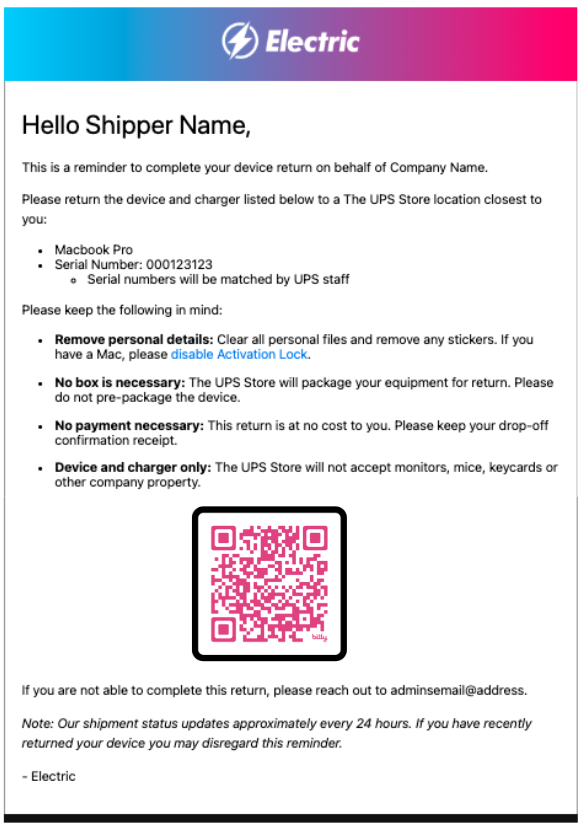
A first reminder, only if the laptop hasn’t shipped within 7 days
-
A final reminder, only if the laptop hasn’t shipped within 14 days
To the address in the Administrator email to receive updates field in the Shipping to section:
-
A confirmation that the initial request has been sent to the shipper
-
A notification that the shipper has been sent an initial reminder
-
A notification that the shipper has been sent a final reminder
-
A notification that the laptop has been shipped, including tracking information
-
A notification that the laptop has been delivered
Emails are sent from noreply@electric.ai. Please add this address to your safe senders list to ensure proper delivery.
Example
Below is an example featuring the first reminder email sent to the employee/ shipper if they do not return their laptop within seven days of the original request.
Need Help?
If you have questions or encounter issues while shipping a laptop, reach out to our support team at support@electric.ai. We're here to keep your devices moving!